
 Set as preferred source


ERP, PIM, PLM, DPP – the textile and fashion industries are increasingly dealing with systems and abbreviations that describe different parts of the same challenge: managing product data and keeping it connected.
Each system serves a different purpose. Enterprise Resource Planning (ERP) manages business operations and supply-chain processes. Product Information Management (PIM) organizes product information, while Product Lifecycle Management (PLM) tracks product development, materials and specifications.
The EU Digital Product Passport (DPP) introduces another requirement: relevant product information must be accessible and connected to the correct product.
In our previous articles, we explored what Textile DPP may require, what is confirmed under EU regulation, and how data moves through the textile supply chain.
Now the practical question is how to connect these existing systems so textile manufacturers and fashion brands can use their product data for DPP implementation.
What data comes from ERP, PIM and PLM?
Textile manufacturers and fashion brands already store much of the product information relevant to Digital Product Passport (DPP) preparation. These records are distributed across systems responsible for different stages of product development, manufacturing and sales.
| System | What data it holds | Role in Textile DPP |
|---|---|---|
| ERP – Enterprise Resource Planning | Suppliers, purchase orders, production batches, manufacturing locations | Connects products to supplier and production records |
| PIM – Product Information Management | Product IDs, SKUs, descriptions, material composition, care instructions | Provides structured information about products and their variants |
| PLM – Product Lifecycle Management | Bills of materials, technical specifications, material selections, product revisions | Links products to approved materials, specifications and design changes |
| Supplier systems | Material origin, certificates, processing records, supporting documents | Provides upstream information and supporting evidence |
Each system maintains a different part of the product record. To prepare information for Textile DPP, companies need to connect these records using shared product identifiers and defined data relationships.
This requires more than transferring files between systems. The integration must account for data ownership, validation and updates. The following section explains how these connections can be organized.
How the systems connect to Textile DPP
ERP, PIM and PLM systems can supply product information to a Digital Product Passport through an integration layer. This layer retrieves records, matches product identifiers, validates data and prepares it for the DPP platform.
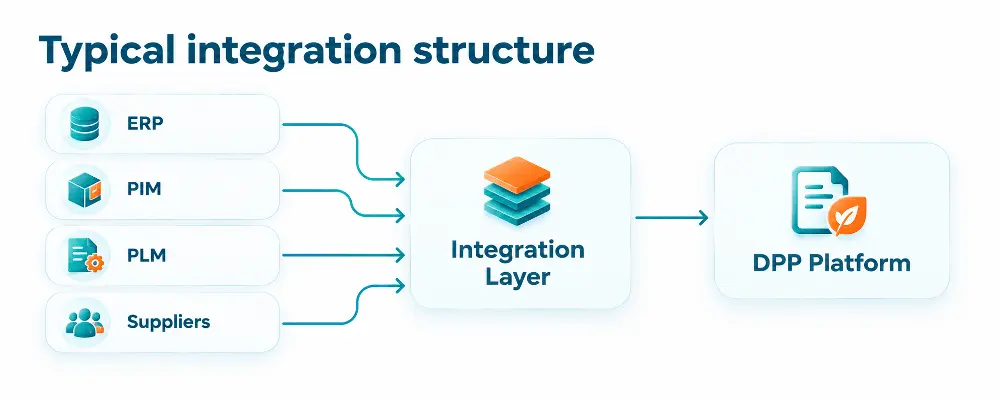
An integration layer is software that connects ERP, PIM, PLM and supplier systems to the DPP platform. It can be a dedicated integration service, an existing middleware platform or a set of API connectors.
It retrieves data from different sources, matches records belonging to the same product, checks their consistency and transfers the relevant information to the DPP platform. The original systems continue to maintain their own data.
The integration process involves four steps:
- Extract: Retrieve relevant records through APIs, database connectors or structured file exchanges.
- Map: Link style IDs, SKUs, material references and production batches to the correct product.
- Validate: Check required fields, data formats, consistency and supporting documentation.
- Synchronize: Transfer validated information to the DPP platform and update it when source records change.
Not every system needs a direct connection to the DPP platform. An integration layer can coordinate data exchange while ERP, PIM and PLM remain responsible for their respective records.
The DPP platform can then make the appropriate product information accessible through a digital identifier, according to the applicable requirements and access permissions.
What needs to be mapped between systems?
A fashion brand may manage thousands of products, each with different materials, suppliers, sizes and production batches. ERP, PIM and PLM store different parts of this information, often using their own product codes.
For Textile DPP, these records need to be connected so that each product is associated with the correct specifications, production details and supporting documents.
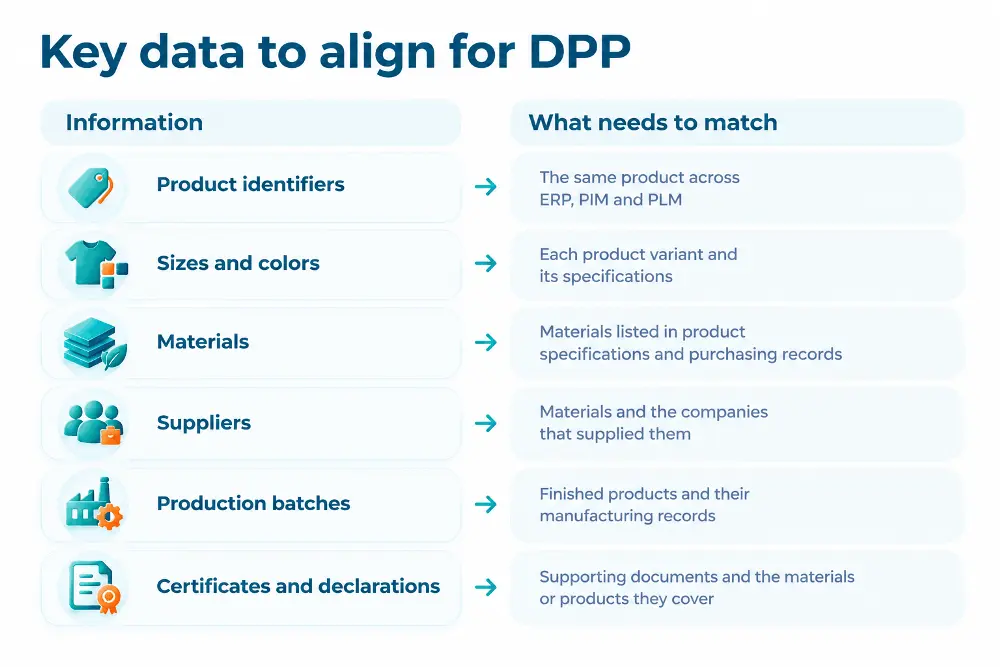
For example, a brand may use the same fabric in several clothing collections. If a supplier updates its material documentation, the company needs to identify which products use that fabric and whether their records require updating.
With connected systems, this information can be traced across product specifications, supplier records and finished products.
The result is a consistent product record built from existing business systems, with information that can be checked and updated as products change.
Common integration problems
Even when ERP, PIM and PLM are connected, product information may remain inconsistent. Most issues arise from differences in how systems identify, store and update records.
| Problem | What can happen | How to address it |
|---|---|---|
| Different product codes | The same garment has different identifiers in ERP, PIM and PLM | Create a mapping between identifiers so records refer to the correct product |
| Outdated information | PLM contains a revised material composition, while PIM still shows the previous version | Define which system controls each field and when updates should be transferred |
| Missing supplier data | Material records exist, but origin information or supporting documents are unavailable | Identify missing records and establish a process for collecting them from suppliers |
| Duplicate records | The same supplier or material appears under several names or codes | Match and consolidate duplicates before exchanging data |
| Incorrect batch associations | Updated specifications are applied to products manufactured before the change | Keep production batches linked to the material versions actually used |
Choosing integration tools
Companies using ERP, PIM and PLM should first check whether their existing software offers built-in connectors or APIs. Standard integrations may be sufficient for transferring product specifications, supplier records and other structured data.
For more complex environments, platforms such as Boomi or MuleSoft can coordinate data exchange between multiple systems. Custom API integrations may be more appropriate when product identifiers, material versions or production batches require specific matching rules.
Before selecting a solution, test whether it can retrieve the necessary records, match identifiers, detect missing information and handle updates without overwriting valid historical data. A pilot involving one product category can reveal technical limitations before a wider rollout.
What to check before integration
Before investing in new software or developing custom integrations, textile manufacturers and fashion brands should assess what their existing systems can already support.
Five checks can help define the scope of integration:
- Identify data sources. Determine where product specifications, material records, supplier information and production data are maintained.
- Check product identifiers. Verify that products, variants, materials and production batches can be matched across systems.
- Review data quality. Identify missing records, duplicate entries, outdated specifications and incomplete supplier documentation.
- Assess integration capabilities. Check available APIs, existing connectors, supported data formats and limitations on data access.
- Test updates. Confirm that changes to materials, suppliers or product specifications reach the correct records without affecting earlier production batches.
A limited pilot with one product category can establish which integrations are technically feasible, where additional data is needed and whether existing tools are sufficient.
The findings can then inform the implementation scope, budget and choice between standard connectors and custom development.
Practical questions about Textile DPP integration
Who is responsible for the accuracy of product data?
Each data field should have a designated owner and an authoritative source. For example, PLM may manage approved material specifications, while ERP maintains production records. Updates should originate in the responsible system and then be synchronized with other systems.
What happens when a supplier or material changes?
Changes must be linked to the products and production batches they affect. A new material specification should not automatically overwrite records for garments manufactured using the previous material.
Does all DPP information have to be publicly available?
No. The EU framework provides for different levels of access depending on the information and the user's role. Integration should distinguish publicly accessible product data from information restricted to authorized parties.
Does DPP integration require replacing existing ERP, PIM or PLM software?
Not necessarily. Existing systems can remain in place if they provide reliable data access through APIs, connectors or structured data exchange. Additional software may be needed to connect records, validate information and manage updates.
How SmithySoft can help
Connecting ERP, PIM and PLM systems requires reliable data exchange, consistent product records and integration with existing software.
SmithySoft provides software audits, custom software development and system integration services. These capabilities can support textile manufacturers and fashion brands in assessing their existing infrastructure, connecting data sources and developing the software components needed for DPP preparation.
The first step is to evaluate which systems and data can be reused and where additional integration or development is required.